
Vident iLink400AU vs iLink400 Max Comparison – Key Differences, Features & Which to Choose
Date Posted:9 September 2025
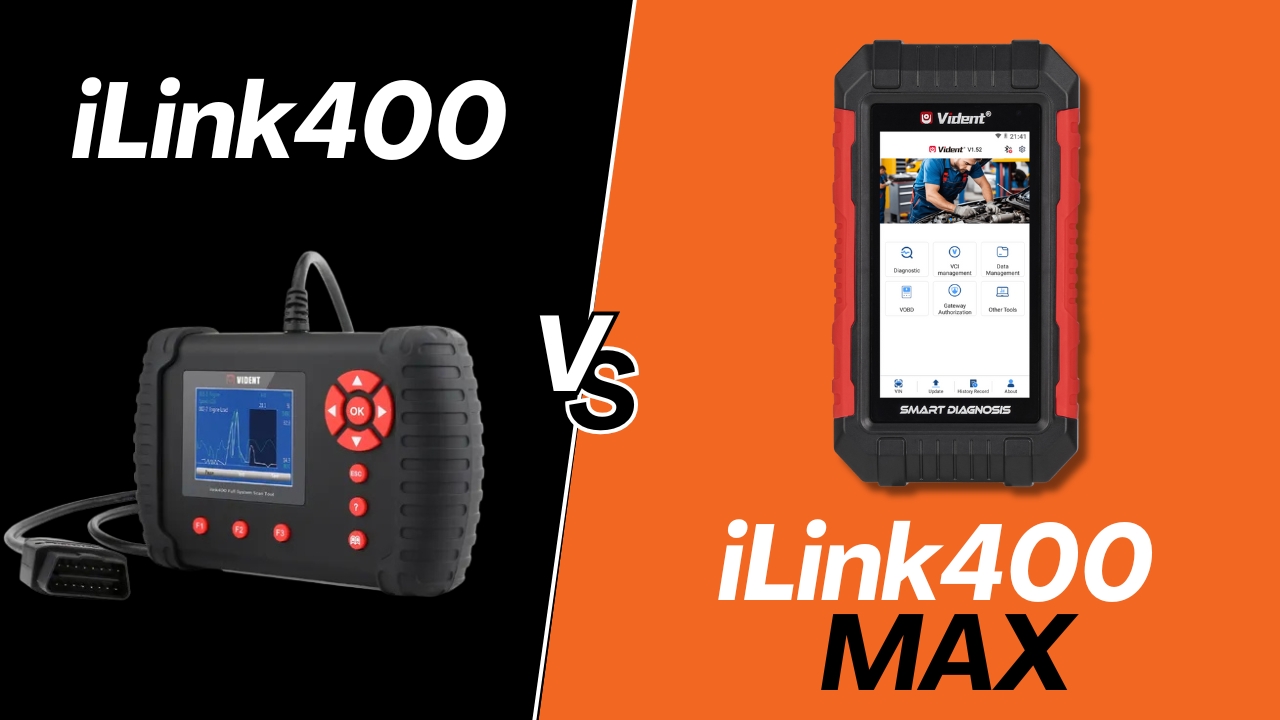
What’s the Difference?
The Vident iLink400AU has long been a popular single make diagnostic scan tool across Australia, known for its reliable functions, wide vehicle coverage options, and affordable entry point for DIYers and professionals.
Now, Vident have released the iLink400 Max – a modernised version of the iLink400 designed with faster hardware, a larger screen, and a wider vehicle coverage to choose from.
So which one should you choose? Let’s break it down.
Display & Usability
- iLink400AU: Compact 2.8" screen with traditional button navigation.
- iLink400 Max: Larger 5.0" touchscreen, wireless Bluetooth Android-style interface, and a built-in Data Manager to save and review reports.
→ The Max offers a smoother, more intuitive user experience — ideal if you’re used to smartphones and tablets.
Connectivity & Updates
- iLink400AU: Updates require connecting to a PC.
- iLink400 Max: Built-in Wi-Fi and in-tool updates (no computer needed).
→ This makes the Max more convenient for users who want quick updates directly from the workshop or garage.
Vehicle Compatibility
Both tools support:
- OBD1, OBD2, and ALDL vehicles starting from the late 90s
- Full systems diagnosis (engine, transmission, SRS, ABS and more)
- Live data
- Bi-directional & active testing
- Advanced service functions (DPF regeneration, injector coding, SAS reset, ABS bleed, oil service reset, etc.)
- Entry level programming capabilities
What’s new with the Max?
- CAN FD & DOIP support for newer vehicle protocols.
- If you want to add more car makes beyond your 1 free which is included, the iLink400Max now offers popular brands like Mitsubishi, Nissan, Isuzu and more – car makes that aren't currently available on the iLink400.
→ If you think you might need access to more car makes down the line, the iLink400Max gives the option for the majority of major passenger vehicle makes.
Key Maintenance & Special Functions
Both tools include an extensive range of advanced service & maintenance functions, such as:
- Injector coding
- DPF regeneration
- Oil service reset
- EPB, BRT, SAS, TPMS, EGR
- ABS brake bleeding
- Gearbox, clutch, and seat matching
- Sunroof reset, window/door calibration
- Immobiliser functions
→ Functionally, both cover the same ground — but the Max executes tasks faster and more smoothly thanks to its upgraded hardware.
Software Updates
- iLink400AU: Free life time software updates (via PC).
- iLink400 Max: Update directly via built in Wifi (3 years free updates – 1 time 55USD payment to unlock life time updates after that)
Which One Should You Choose?
Choose the iLink400AU if…
- You want a proven, reliable tool at a more affordable price point.
- Perfect for owners of a single vehicle brand (e.g. Toyota, Ford, Holden).
- You prefer a traditional scan tool with actual buttons and a wired connection
Choose the iLink400 Max if…
- You want the latest hardware with a bigger touchscreen and smoother navigation.
- You prefer Wi-Fi updates and in-tool convenience.
- You need compatibility with newer models using CAN FD & DOIP protocols.
- You want the option to access a wider rnage of brands including Mitsubishi, Nissan, Isuzu, Suzuki etc. and the option to download directly through the scan tool
Final Thoughts
Both the iLink400AU and the iLink400 Max are excellent choices, offering professional-grade diagnostics and service functions. The iLink400 remains a compact and rugged favourite, while the iLink400 Max brings a modern user experience with broader vehicle coverage options, smoother UI, and compatibility with more modern vehicle protocols.
→ Explore the Vident iLink400AU here or check out the iLink400 Max here to find the right fit for you.
Vident iLink400 vs iLink400 Max
Comparison Table
|
iLink-400AU
|
iLink400Max
|
|
|---|---|---|
| Display | 2.8" | 5.0" |
| Touch Screen | - | ✓ |
| Data Manager | - | ✓ |
| WiFi Connection | - | ✓ |
| In Tool Updates | - | ✓ |
| Compatibility |
OBD-I / OBD-II |
OBDI / OBD-II |
| Coverage |
1 Brand of Choice |
1 Brand of Choice |
| Add Car Brands | ✓ | ✓ |
| CAN FD Support | - | ✓ |
| Full System Scan | ✓ | ✓ |
| Auto VIN Identification | ✓ | ✓ |
| Live Data | ✓ | ✓ |
| Bi-Directional Active Test | ✓ | ✓ |
| ECU Coding Adaptation | ✓ | ✓ |
| Oil Service Reset | ✓ | ✓ |
| EPB(Electronic Parking Brake) | ✓ | ✓ |
| BRT(Battery Configuration) | ✓ | ✓ |
| DPF(Diesel Particulate Filter) | ✓ | ✓ |
| TBA/TPS(Throttle Body Alignment) | ✓ | ✓ |
| Injector Coding | ✓ | ✓ |
| SAS(Steering Angle Sensor Reset) | ✓ | ✓ |
| ABS Bleed | ✓ | ✓ |
| Suspension Match | ✓ | ✓ |
| EGR | ✓ | ✓ |
| TPMS | ✓ | ✓ |
| Turbo | ✓ | ✓ |
| Gear learn | ✓ | ✓ |
| Immobolizer | ✓ | ✓ |
| Adjust Fuel | ✓ | ✓ |
| Sunroof Reset | ✓ | ✓ |
| Gearbox | ✓ | ✓ |
| TCM Oil Reset | ✓ | ✓ |
| AT Adaptation | ✓ | ✓ |
| Change Tyre Size | ✓ | ✓ |
| Clutch | ✓ | ✓ |
| Seat Match | ✓ | ✓ |
| PFP | ✓ | ✓ |
| Windonws Door | ✓ | ✓ |
| Software Update | Free |
3 Yrs Free (One time 55USD fee after that for free lifetime updates) |
| LEARN MORE | LEARN MORE |
Comparison tables are for reference only. They demonstrate general functions and features of our products. The compatibility for these functions may vary depending on vehicle's make, model and year. Refer to our function lists or contact us for more information.